
TL;DR:
-
Enable the integration in the Time Doctor admin dashboard.
-
Install the Time Doctor Chrome extension from the Chrome Web Store.
-
Refresh Jira or Trello after installation.
-
Check whether the Start Timer button appears.
-
If the button does not appear, follow the troubleshooting steps below.
This article explains how to troubleshoot and resolve issues when the Time Doctor Start Timer button does not appear in Jira or Trello. If the Start Timer button is missing, enable the integration in the Time Doctor admin dashboard, install the Time Doctor Chrome extension, and refresh the page. If the button still does not appear, place Jira or Trello in the first browser tab and refresh again.
- Enable the integration and ensure the Time Doctor Start Timer button appears in Jira and Trello.
- Follow practical troubleshooting steps when the button is missing.
Enable the integration
- Have an administrator enable the Integration settings from the Time Doctor admin dashboard.
Install and verify the Chrome extension
-
Install the Time Doctor Chrome extension.
-
After installing, refresh the Jira or Trello page to let the extension detect the site.Open the Time Doctor Chrome extension and confirm you are logged in with your Time Doctor account. If you are not logged in, sign in before refreshing the Jira or Trello page.
JIRA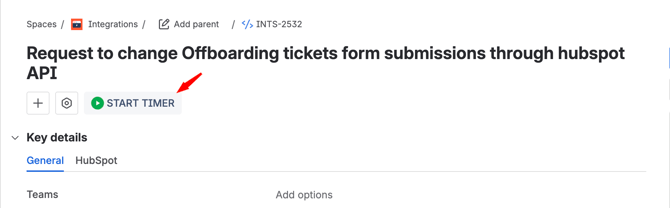
Trello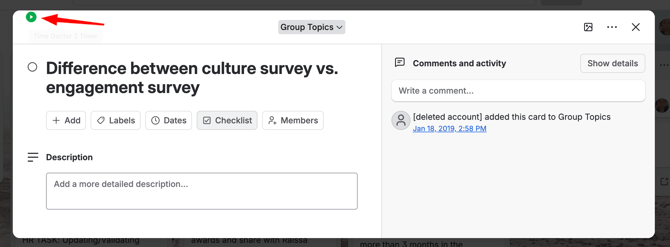
What should I do if the Start Timer button does not appear?
-
1. Refresh the page
Refresh Jira or Trello after installing the extension and enabling the integration. -
2. Make the site the first browser tab
Place Jira or Trello in the first tab of the browser and refresh the page. Placing the site in the first tab allows the extension to detect and add the Start Timer button as soon as the URL is recognized. Note that results may vary depending on the browser being used.
Notes and best practices
-
Confirm an administrator has enabled Integration settings in the admin dashboard before troubleshooting client-side steps.
-
Install the Time Doctor Chrome extension and refresh the page for the Start Timer to appear.
-
Making the target site the first browser tab increases the chance the extension will detect it and display the Start Timer.
Follow these steps:
-
Ensure the integration is enabled by an administrator.
-
Install the Time Doctor Chrome extension.
-
Refresh the page, and make Jira or Trello the first browser tab if the Start Timer does not appear.
These actions resolve common issues with the Time Doctor button appearing in Jira and Trello.
Should there be any inconsistencies or concerns regarding the article, contact support@timedoctor.com for prompt assistance.