
Note: The Software Cost Insights report is available on the Premium plan or as an add-on to the Standard plan. It can be accessed by Owners and Admins.
TL;DR:
Use the Software Cost Insights report to monitor license usage, analyze tools across the Group hierarchy, and identify cost-saving opportunities.
How to Use the Software Cost Insights Report
The Software Cost Insights report helps visualize how paid software licenses are used across teams and group hierarchies to identify opportunities for reducing unnecessary expenses. Each section presents license usage, cost, and potential savings in one view.
Use Cases
- Identify underused or unused software licenses
- Reduce software costs by reallocating or removing licenses
- Analyze software usage across different groups and subgroups
- Understand trends in tool usage across the organization
How to navigate by groups and subgroups
Important Notes
- Historical data is available from the first day time tracking began.
- The Summary view is available only on a month-by-month basis.
- A tool can now include multiple domains or sources (e.g., canva.com, canva.link) under one selection.
- Use the Group hierarchy filter to drill down into specific teams or organizational levels.
How to Access the Report
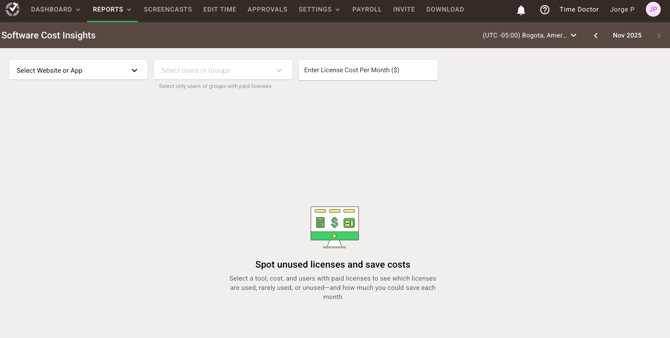
- Log in to the Time Doctor Dashboard.
- Navigate to Reports / Software Cost Insights Report.
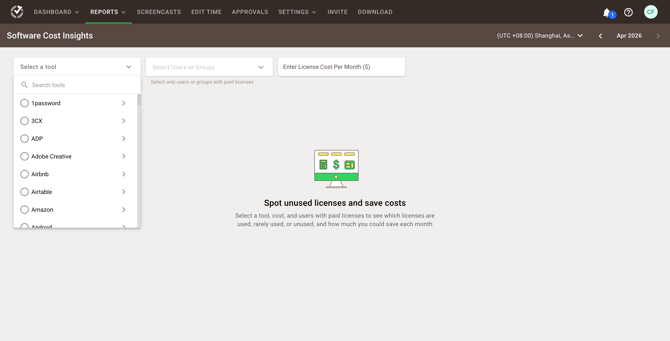
- Select a tool using the dropdown.
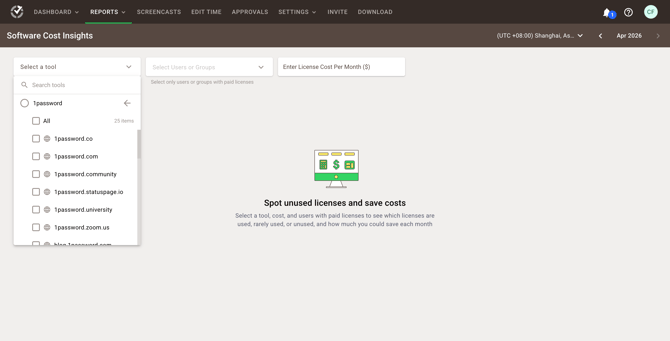
- Select specific domains or sources within the tool.
Tool Selection and Group Hierarchy
The tool selection dropdown now supports grouped sources and hierarchy-based filtering:
- Select a parent tool (e.g., Canva) to view all associated domains..
- Expand the tool to view individual sources (e.g., canva.com, canva.link)
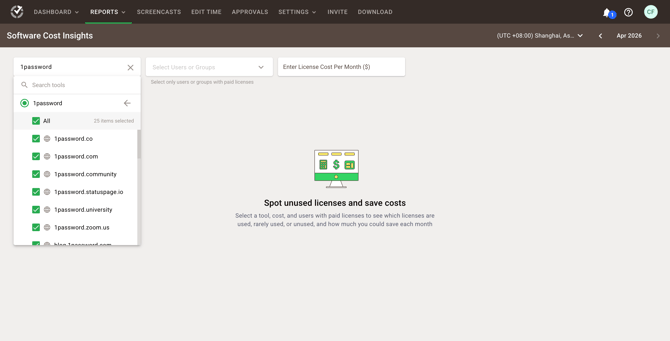
- Select All to include every source under the tool.
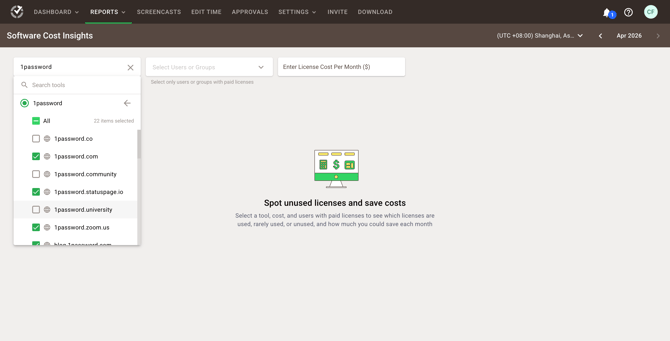
- Select individual sources to refine the analysis.
- Combine this with Group hierarchy filters to analyze usage at different organizational levels.
Highlights (Updated Feature Behavior)
- Multiple sources can be analyzed under a single tool.
- Partial selections are supported (e.g., one domain only).
- Selection state is clearly indicated (all selected, partially selected, or single selection).
Widget Descriptions
Summary
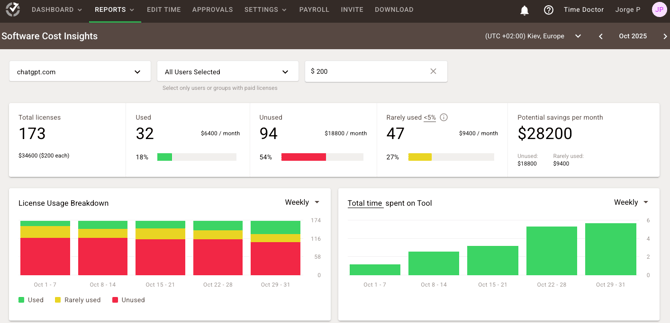
- License Summary: Displays the total number of tracked licenses and total monthly cost, based on the entered price.
- Usage Breakdown: Shows usage status of licenses categorized as Used, Unused, and Rarely used.
- Potential Savings: Estimates possible monthly savings from reclaiming or reallocating unused or rarely used licenses.
Tip: A license is considered "rarely used" if it is used less than 5% of the time during the tracking period. Adjust this threshold based on internal policy.
License Usage Breakdown Chart
This chart shows how software licenses are used over time.
Use it to:
- Track weekly usage patterns
- Identify consistently unused tools
- Spot opportunities to save based on usage trends
% of Total Time Spent on Tool Chart
This chart reveals the percentage of total tracked time spent using the selected application.
License Usage by Users Table
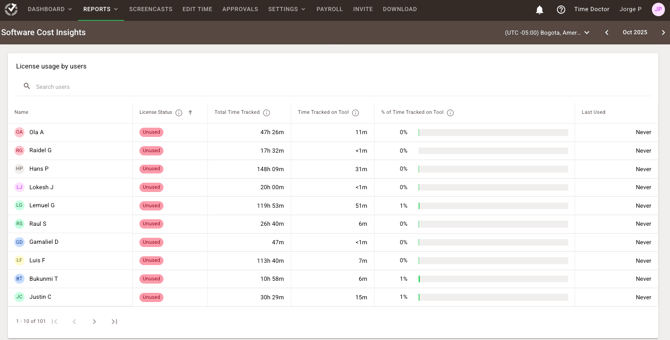
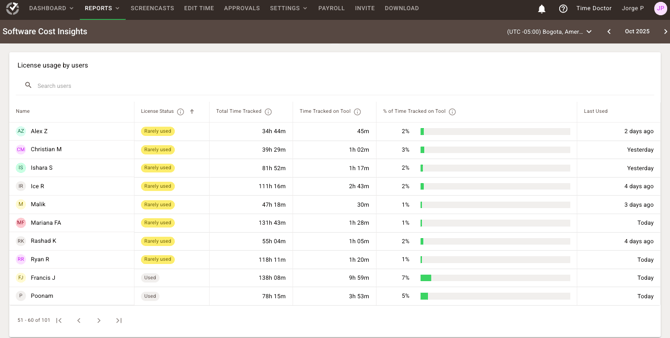
Provides detailed data on individual team members' software usage.
Use it to:
- Identify active license users
- Determine licenses for potential reallocation or removal
- Analyze usage across groups and subgroups
- Make informed, user-specific license decisions
Example: If a user shows less than 5% tool usage over the past 30 days, consider canceling their license.
Should there be any inconsistencies or concerns regarding the article, contact support@timedoctor.com for prompt assistance.